Connect Microsoft Copilot and Foundry Agents to Governed Data with Informatica Headless
Table Of Contents
Table Of Contents
A technical walkthrough for data platform teams running Microsoft 365 Copilot, Copilot Studio, Microsoft Foundry, and Informatica IDMC side by side.
Organizations are enabling agents within their enterprise for the various personas of Knowledge workers in the enterprise, each in the surface they already work in: a business user in Copilot, an analyst in a chat window, a steward in a governance tool or a data professional on an AI assisted coding Integrated Development Environment (IDE). Wherever the question is asked, the agent needs two primary things: data it can trust, and the context to use that data correctly.
Informatica Headless addresses those exact needs. It exposes data management capabilities as Model Context Protocol (MCP) servers, such as catalog and governance, data quality, master data management, integration, and data provisioning. Any agent that speaks MCP can use Informatica Headless, which delivers trusted data and context to the point of need, across the agentic surfaces their personas already use - no integration required.
Take an analyst asking Microsoft 365 Copilot: "What was net revenue from our top 10 enterprise customers last quarter, and which are at renewal risk?" A reliable answer depends on three things that live outside the query layer:
- Who the customers are: Is "Acme Corp" one customer or seven records? MDM resolves entities across systems into a golden record (for example, in Customer 360), along with attributes like tier and location.
- Which data to trust: Of four candidate customer or revenue tables, the enterprise catalog shows which is certified, who owns it, its quality scores, and glossary bindings across SAP, Salesforce, Oracle, and the warehouse.
- What the terms mean: The business glossary defines "net revenue" for your organization (for example, after returns, credits, and rebates).
Informatica Headless answers all three. The agent then runs its query against the right customers, tables, definitions, and columns to assess renewal risk. Since Copilot Studio and Microsoft Foundry both consume remote MCP servers as tools, each platform does what it does best, with no custom integration code on either side.
MCP brings these strengths together. Informatica Headless exposes its metadata, data quality, and master data services as MCP servers. Copilot Studio and Microsoft Foundry both consume remote MCP servers as tools. Each platform does what it does best, and no bespoke integration code is required.
This article covers how the solution works, where the tools attach across the Microsoft agentic surfaces, how access is secured with Microsoft Entra, and what the resulting request flow looks like end-to-end.
Solution Overview
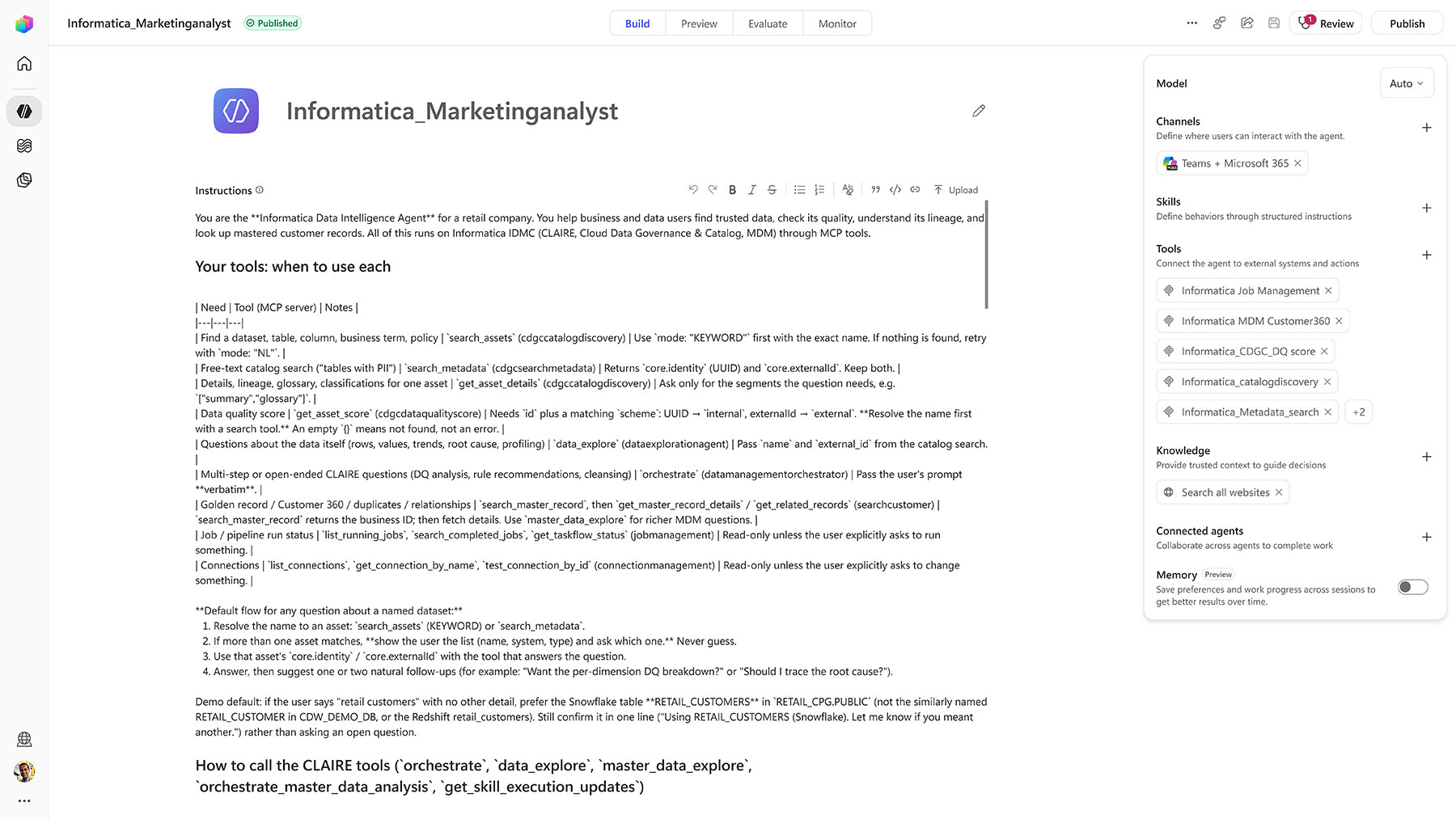
Informatica’s new MCP servers and skills support several facets of data management. They include semantic metadata retrieval from Informatica's data catalog through data discovery, and CLAIRE (purpose-built data management) agents for data exploration and orchestration. Informatica recently announced that its Headless MCP servers are generally available in Microsoft Foundry and listed in the Foundry Tools Catalog. The services named in that announcement span across Cloud Data Governance and Catalog metadata search, Cloud Data Quality, Cloud Data Integration, Cloud Address Verification, Customer Identification (MDM), Job Management, and Data Provisioning.
Sample Headless Informatica capabilities relevant to a Microsoft agent deployment:
| Informatica capability | Representative tools | What it answers |
|---|---|---|
| Metadata Explorer (CDGC): data discovery and semantic metadata | search_assets, get_asset_details | Which asset is authoritative, who owns it, what it means, what is classified, and what policy applies |
| Data Quality: CLAIRE data exploration | data_explore | Column profiles, value distributions, null density, and quality checks on a source dataset |
| MDM: CLAIRE data exploration | master_data_explore | Golden records, merged record composition, match/merge rules, and cross-entity relationships from Customer/Product/Provider 360 |
| Data Provisioning | Marketplace request/approval | Governed access requests to an asset the user cannot yet read |
| Job Management: orchestration | Task execution | Trigger an IDMC integration task to deliver data to a target |
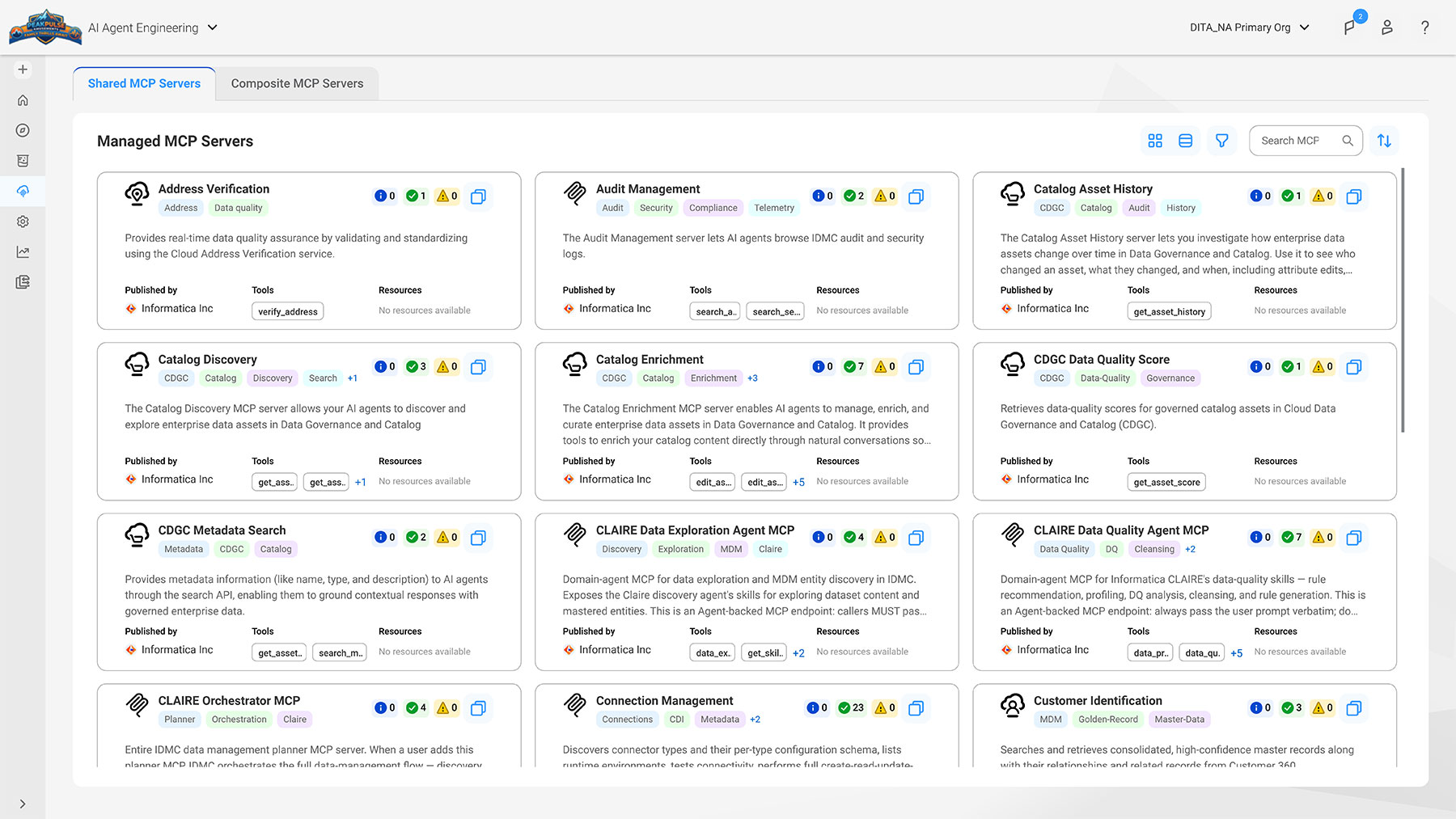
Beyond these commonly used MCPs, Informatica has released additional MCPs that deliver other discrete abilities to platforms like Copilot and Foundry. These are discoverable through Informatica’s MCP registry inside Informatica’s Intelligent Data Management Cloud (IDMC) AI Agent Engineering section.
Securing access with Microsoft Entra
Access to the Informatica MCP servers follows a familiar pattern used by Microsoft administrators.
Entra app registration plus group-based access. Register an application in Microsoft Entra for the Informatica MCP servers. Create an Entra security group for the people who should reach them, add those users to the group, and assign the group to the application so that only group members are allowed to access the app and connect to the MCP servers. Onboarding and offboarding then become group membership changes, and Conditional Access and access reviews apply the way they do for any other enterprise application.
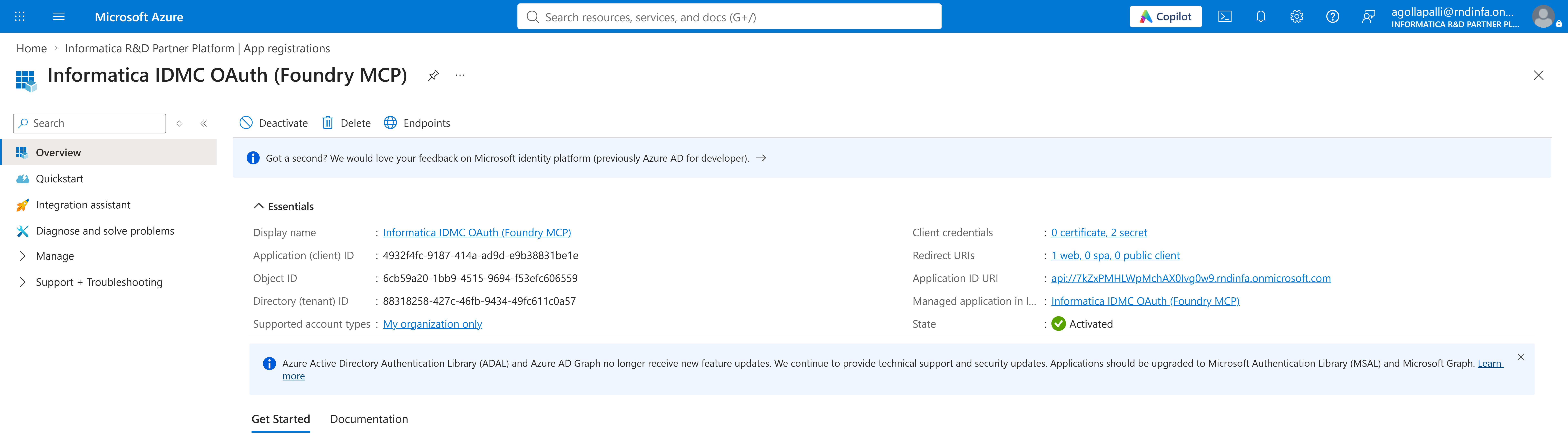
Take the exact app registration settings from Informatica’s documentation: the application ID URI or audience, the scopes the MCP servers expect, and the redirect URIs.
Wiring It Up
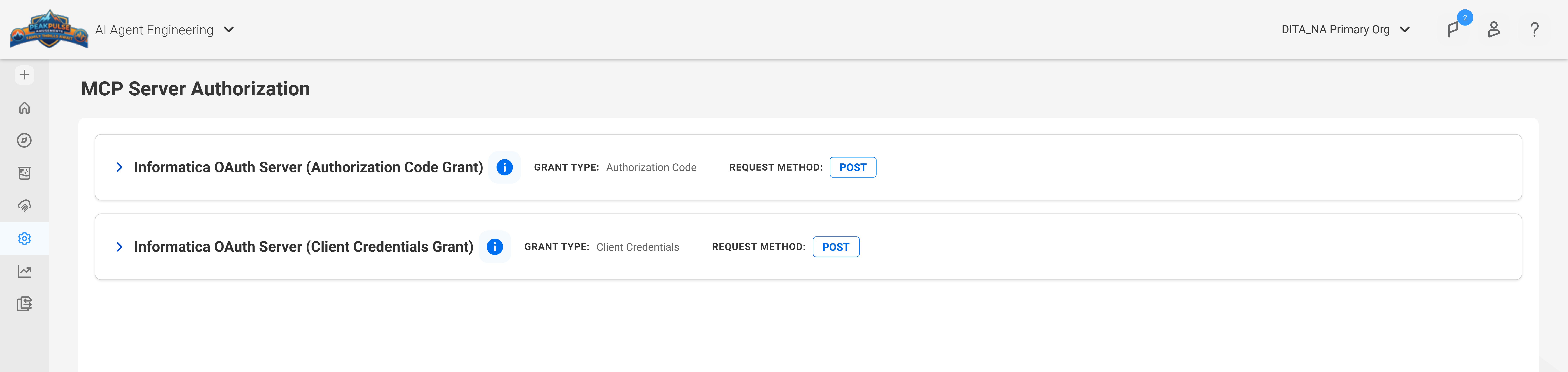
Create an app registration, a connection with the MCP server, and a group assignment. Replace the placeholders with your own values and keep any client secret in your secret manager.
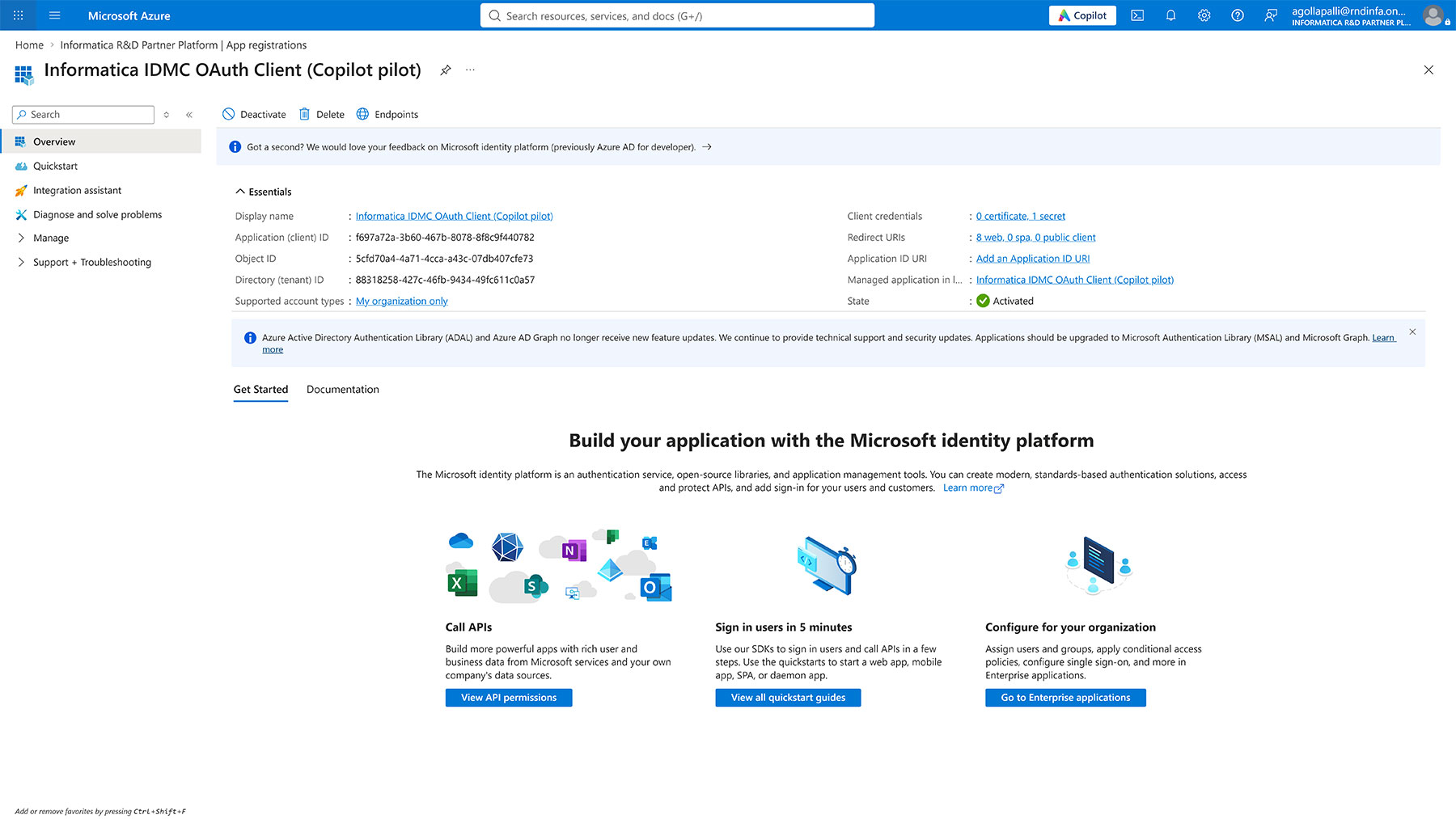
Step 1: Register the application in Microsoft Entra as Informatica’s documentation specifies, and record the tenant ID, client ID, and the scopes the MCP servers expect. Ensure the Application ID Uri in the app points to the IDMC org id (e.g. Api://<>.domain_name.com). The domain name is available in your Entra service layer.
Step 2: Create a security group (for example idmc-mcp-users), add the intended users, and assign the group to the application. Require user assignment so that non-members cannot connect.
Step 3: Add the app client id, and client secret in the copilot studio with the MCP remote endpoint available in the Informatica IDMC AI agent engineering service.
Step 4: Add the redirect URI as part of the Entra app: when you create the connection in copilot studio, copilot studio will provide a redirect uri when you hit connect in the copilot studio, this is to establish that the app knows who is able to authenticate the settings.
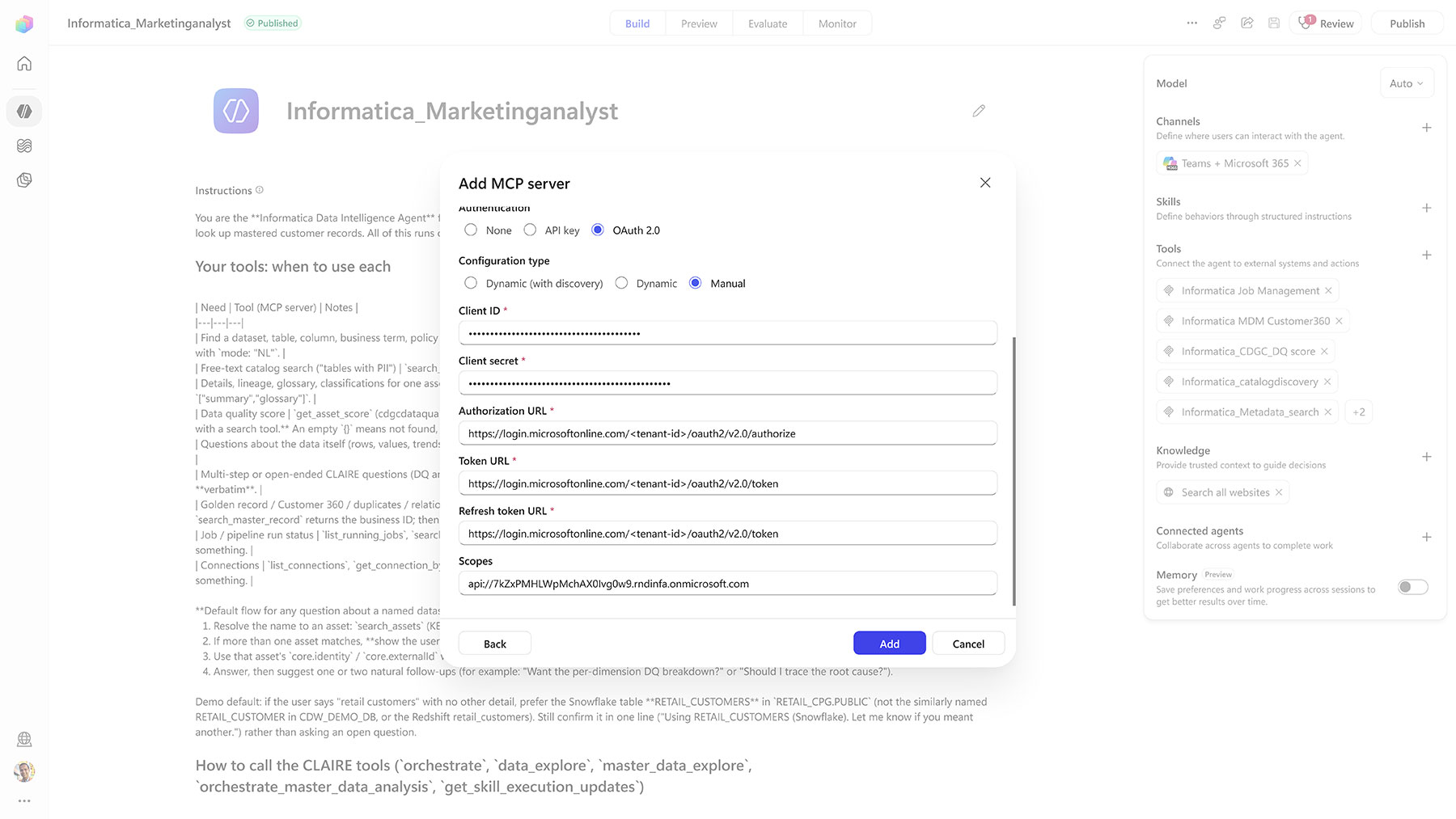
Copilot Studio
Step 1 Add the MCP tool: Within Copilot studio, choose Add a tool > New tool > Model Context Protocol. Enter name, description, and the Informatica server URL.
Step 2 Choose OAuth 2.0:With the Entra app registration from Step 0, choose Manual and supply the client ID, client secret, and scopes, plus these endpoints with your tenant ID filled in: authorization URL https://login.microsoftonline.com//oauth2/v2.0/authorize, and token URL and refresh URL https://login.microsoftonline.com//oauth2/v2.0/token.
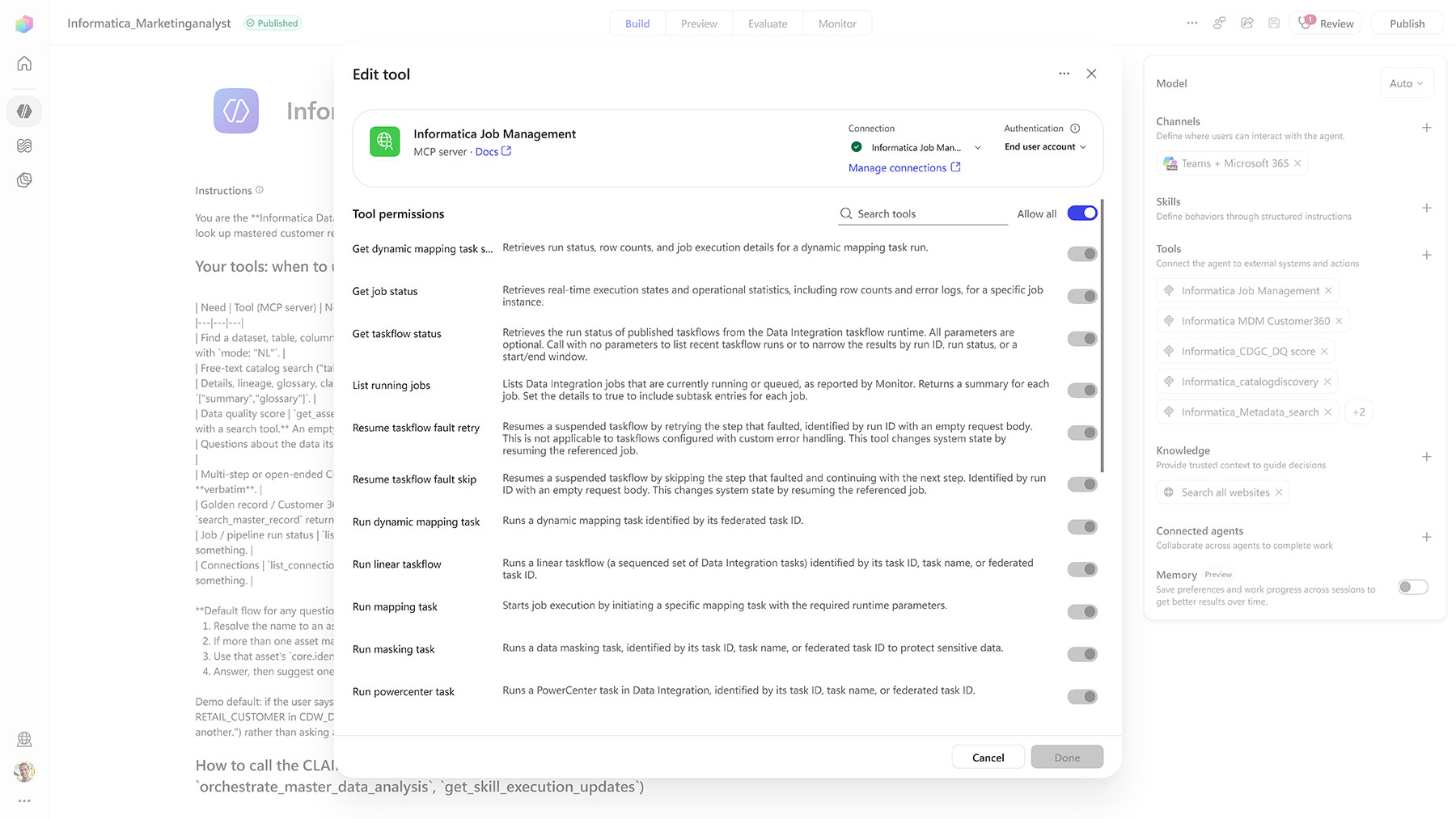
Step 3 Create the connection and add it to the agent: Select Create a new connection, then Add to agent. Turn on generative orchestration for the agent. MCP tools are selected by the orchestrator.
Step 4 Add the redirect URI: When you create the connection, copilot studio will provide you a redirect URI, copy the URI and add this in the Entra application you just created in step 0, to ensure that the authentication flows and the app validates only your agent. You can have many agents connect to the same application.
The Path of Trust and Confidence
Every call from a Microsoft agent surface to an Informatica tool traverses a governed path, shown below with the control plane (agent, orchestration, Entra) and the data plane (MCP server and enterprise data estate):
Connecting a natural-language interface to the enterprise data and to the data catalog worries data governance teams for a good reason. Anyone who can ask a question can now reach metadata and data they never opened a catalog or a table to see. Credentials pasted into prompts or shared across users make it impossible to say who asked for what. And an agent in one surface can end up with broader access than the same person has anywhere else.
Informatica Headless addresses this critical situation by tying every call to a named person, using the identity system the organization already runs.
- No secrets in prompts. The agent, whether in Copilot Studio or Foundry, gets an access token for the signed-in user through Entra after the user consents, and presents that token to the MCP server. No shared password or key sits in a prompt or an agent configuration.
- Access is gated twice. The Informatica MCP server checks the token against its Entra app registration, and only users in the assigned Entra group can obtain one. People outside the group cannot reach the glossary, the catalog or the data behind it.
- Access follows the person. Because every call is made as the signed-in user, Informatica sees the individual and not a shared service account. Onboarding and offboarding become Entra group changes, and Conditional Access and access reviews apply as they do for any other application.
- One gate to the data, not one per source. The same sign-in also protects the data itself. When a user asks to retrieve data from an enterprise source, the connection settings for that source are stored in Informatica, not in the agent. Only an authenticated user with Entra access to the application can see the underlying data. Teams do not need to set up access to each dataset separately for the agent, because a single gate validates the user and returns the data.
Informatica MCPs in Action
Now let’s look in detail at the earlier example from this post, when a revenue analyst opens Microsoft 365 Copilot and asks, “What was net revenue from our top 10 enterprise high spending customers last quarter, and which of them are a renewal risk?”. With Informatica MCP’s enabled and the MCP tools registered, it’s reasonable to expect that the analyst is in the Entra group.
- Find a trustworthy asset. Before running any query, the agent asks the Informatica catalog what “enterprise customer revenue” maps to across the estate, not just in the warehouse. Four candidate tables narrow to one that is certified, published and has a named steward. The catalog also shows that the warehouse copy is derived from a certified table in SAP, so the analyst knows whether they are looking at the system of record or a downstream copy. This uses enterprise-wide certification and lifecycle state, which the query tool’s own schema and instructions do not carry.
- Check what is safe to return. The agent retrieves the asset’s classification, business glossary and ownership. Two columns, tax_id and contact_email, are flagged as sensitive and excluded. The glossary supplies the governed definition of net revenue (gross less returns, credits and channel rebates), which the analyst’s own mental model probably omits. The catalog also names the data owner for any follow-up. This step improves answer quality most, and it is invisible in the output.
- Resolve the customers. “Top 10 enterprise customers” is meaningless if Acme Corp appears as seven rows across SAP, Salesforce and a regional billing system. The agent asks Informatica master data management for the golden records, along with the source records merged into each and the parent-subsidiary relationships. This tells the agent whether a subsidiary’s spend rolls up into its parent’s ranking, which can silently reshuffle a top-10 list. The result is one resolved customer ID per customer for the query to use.
- Profile before trusting the number. The agent asks Informatica data quality to profile the revenue data for the quarter. If 9% of rows have a null net_revenue_amt, concentrated in one region, the analyst needs that caveat attached to the answer. A query tool will aggregate over nulls without mentioning it.
- Run the query. With the authoritative table, the governed metric definition, the excluded columns and the resolved customers in hand, the question goes to the data query tool. It runs the query under the caller’s Entra identity, so existing row-level and column-level security still apply. The description you write for this tool is what the orchestrator uses to route the call.
- Close the access gap, if there is one. If the certified table turns out to be one the analyst cannot read, the Informatica data provisioning tool raises a governed access request. On approval, the job management tool delivers the data to the target, and the request and approval are auditable end-to-end, requiring explicit approval before these tools run, since they change state. This is where the pattern stops being a read-only convenience and starts replacing a ticket.
Conclusion
Agents are showing up wherever people work, and each of them needs the same thing: data it can trust, and the context to use with confidence. Informatica Headless delivers both at the point of need. The agent surface can be Microsoft 365 Copilot, Copilot Studio, Foundry or another MCP-capable tool, and the trusted data and context come from the same governed source every time, with access controlled through the Entra identity the organization already uses.
Learn more:
- Informatica Deepens Collaboration with Microsoft to Deliver Trusted Data for Agentic AI and Analytics at Scale
- Microsoft Learn: Connect your agent to an existing MCP server (Copilot Studio)
- Microsoft Learn: Set up MCP server authentication (Foundry)
- Microsoft Learn: Connect agents to MCP server endpoints (Foundry)