
Build Trustworthy AI on Databricks with Informatica AI Governance for Databricks Models
Table Of Contents
Table Of Contents
Informatica’s Cloud Data Governance and Catalog (CDGC) provides AI Governance capabilities that help Databricks customers build and monitor AI applications responsibly.
Trustworthy AI isn’t merely about a single deployment of a model but an end-to-end commitment to robust data practices, accountable governance and continuous monitoring. AI models might be the celebrity chefs but it’s necessary to maintain an organised, hygienic, and well-functioning kitchen – the reliable data pipelines – to run a restaurant (AI application) smoothly.
With data and AI assets spread across different systems, platforms, applications, and physical locations, enterprise data estates can be complex. As a result, a cohesive view of the entire organization’s data from a centralized governance tool is essential to produce reliable, high-quality data for AI applications. With the recent advances and increase in AI applications, producing this centralized view gets even more challenging because of the AI specific assets (such as the models, metrics, evaluation pipelines, etc.) that need to be continuously monitored and governed.
Informatica and Databricks have enjoyed a long-standing technology partnership focused on empowering organizations to unlock the full value of their enterprise data. As an award-winning Databricks partner, Informatica’s comprehensive integrations to the Databricks Data Intelligence Platform have helped hundreds of enterprise customers accelerate their modernization journey to Databricks. This was achieved by providing industry-leading data integration and governance capabilities which unlock enterprise-grade analytics and AI application development initiatives on Databricks. We are glad to unlock a new chapter in this partnership with Informatica’s AI Governance capabilities for Databricks models.
Let’s first discuss Informatica’s AI Governance for Databricks Models, a newly released capability included in Informatica’s Cloud Data Governance and Catalog (CDGC), then show a sample AI use case implemented on Databricks and how it can be seamlessly governed with CDGC.
Informatica’s AI Governance for Databricks Models
Governance professionals are often left in the dark when the data under their remit goes into external platforms for developing AI models. They lack complete visibility around the development and deployment of AI applications. Informatica’s AI Governance capabilities address this problem by providing the oversight and controls needed for governance officers to ensure the safe and effective operationalization of AI applications.
AI Governance in CDGC supports the practical implementation of governance frameworks, automates slow and manual documentation and approval processes, and easily handles the scale and fragmentation of AI tooling across different platforms. Together with the granular technical metadata captured by Databricks Unity Catalog, Informatica – with its rich business metadata and AI Governance capabilities – provides all the necessary guardrails for governance practitioners to support trustworthy AI development.
Key capabilities provided in Informatica’s AI Governance for Databricks Models include:
- An inventory of AI use cases to provide oversight of how and why AI is being used.
- An inventory of AI systems including Agents, Conversational AI, Generative AI and machine learning applications.
- Automated cataloguing of Databricks AI Models.
- AI model lineage – enabling oversight of the data used to train, fine-tune and evaluate an AI model as well as any foundation models it is based on.
- AI model evaluation metrics – providing governance officers with clear evidence of how an AI model has been evaluated.
- Customizable approval workflows – enabling organizations to implement stakeholder approvals for the use of AI models, the development of AI systems and the deployment and ongoing use of AI.
AI Use Case, Stakeholders and Their Requirements
Use case: Build a sales forecasting model in Databricks to support inventory planning, enable dynamic pricing, and create promotion strategies.
Stakeholders: Although there will be multiple stakeholders, for the purpose of this post let us focus on two key personas: AI Product Owner and AI Governance Steward.
Requirements: Product Owner (PO) requires appropriate access to data, reliable and scalable compute environments, trustworthy infrastructure, etc. Governance Steward (GS) requires appropriate checks, approval workflows, audit trials, compliance tools, etc.
Example flow: PO puts forward the case for this AI project to GS, who then approves it, after risk assessment, and grants access to the required data. They might also request certain metrics to be monitored while building and deploying the application. They could also set workflows for approving an AI project or use of an AI model within a project.
Building with Databricks and Informatica – Overview
Step 1: Create an AI system in Informatica CDGC
In CDGC, users can create an AI system, to which AI models (both internally developed and external foundational models) can be attached. This AI system class essentially captures all the information about the project, data sources, stakeholders for the Governance Steward to issue appropriate permissions.
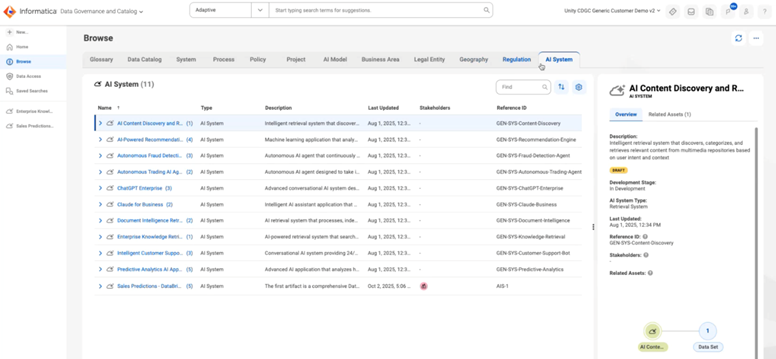
Figure 1: The AI System asset type in CDGC captures all the relevant information used for developing an AI application.
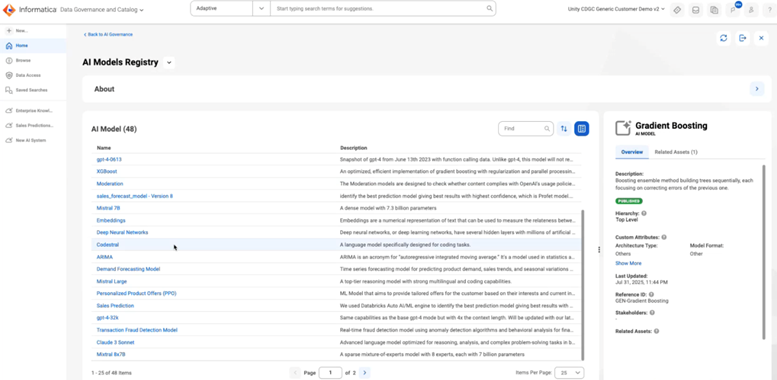
Figure 2: The AI models registry lists all the AI models used in the enterprise across all AI applications.
Step 2: (Optional) Ingest the required data into Databricks
Users can bring trusted data from across hundreds of different sources with IDMC to Databricks. IDMC’s intuitive interface, together with its AI capabilities, enables users to seamlessly ingest data into Databricks without requiring technical expertise.
Step 3: Develop the model and capture the training metadata
Build the model on Databricks and make sure to track the metrics defined by the Governance steward inside Informatica. This model development is an iterative process. Use tools such as MLFlow and Databricks Unity Catalog to capture the versions and all other relevant metadata about the model.
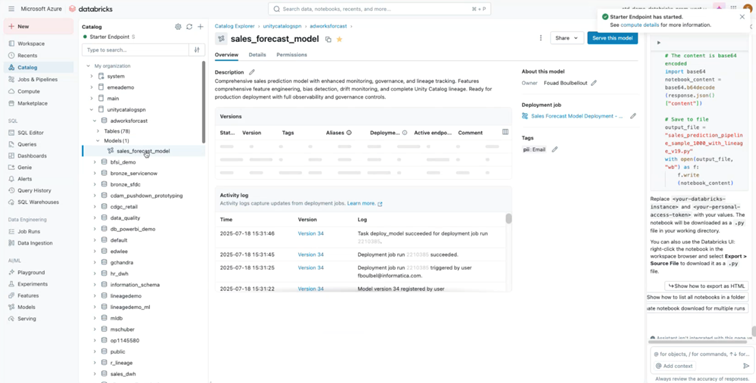
Figure 3: AI Model metadata captured inside Databricks Unity Catalog during training.
Step 4: Import metadata from Unity Catalog to CDGC
Automatically import metadata about the AI model from Databricks UC to Informatica using the connectors from CDGC. Ensure that the evaluation metrics agreed with the Governance Steward are captured during the training process and imported into CDGC.
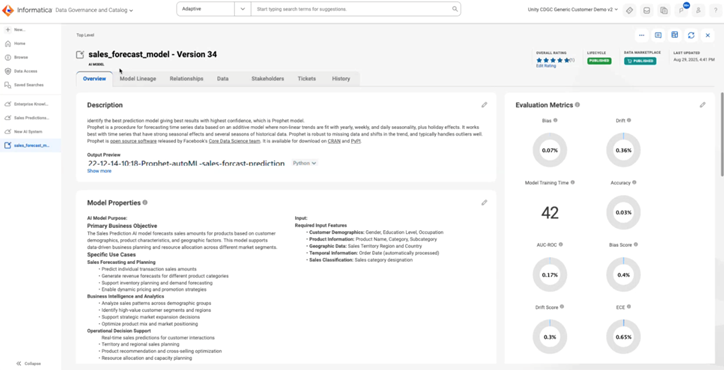
Figure 4: AI model metadata imported to CDGC from Unity Catalog.
Step 5: Visualise the model lineage, performance metrics, quality assessments, and other info
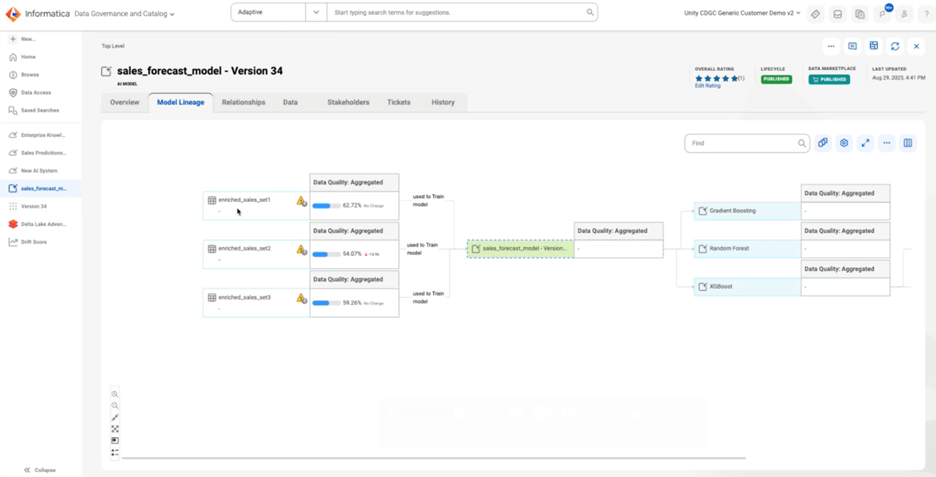
Figure 5: Data quality metrics and lineage of the data used for training the model visualized inside CDGC.
How do I get started?
If you are looking to take the next step towards enabling more reliable AI, find out how to launch a data & AI governance project.